Important notes
Warning
If you have any chronical disease or skin disease, or If you are undergoing, or have recently been undergoing a medical skin treatment, you must consult your doctor or dermatologist before using this device.
Caution
For hygienic reasons, the device should only be used by one person.
Use the device only at settings suitable for your skin type. Using at higher settings than those recommended can increase the risk of skin reactions and side effects.
Do not look directly at the flash window while using the device. We recommend using the provided safety glasses while using the device.
Use the device in a well-lit room, so that the light is less glaring to your eyes.
Never leave the device unattended when it is switched ON. Always switch OFF the device after use.
Tanning with natural or artificial sunlight might influence the sensitivity and color of your skin.
Before you use the device, you should clean your skin and make sure it is hair-free, entirely dry and free from oily substances.
Do not treat the same skin area more than once during a session.
If you experience discomfort or pain, reduce the light intensity level.
Areas
Never use the device in these areas:
1. Around the eyes or near the eye brows.
2. On the lips, nipples, areola, vagina, anus and inside of the nostrils and ears.
3. Men must not use the device on the face and neck including all beard growing areas, nor on the genital area.
4. Over or near anything artificial like silicone implants, subcutaneous injection ports (for instance an insulin dispenser) or piercing.
If you are not sure whether you can use the device, please consult your doctor.
Device Description
1.1. Device description
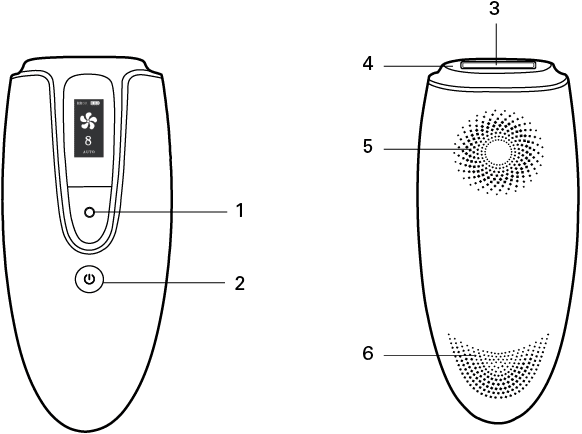
1. Flash button
2. On/Off Button
3. Light exit window
4. Skin Contact Surface
5. Air inlets
6. Air Vents
1.2. Display interface
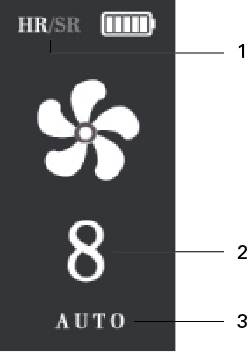
1. Function (HR/SR)
2. Light Intensities (1-8)
3. Mode (Auto/Manual)
1.3. Accessories
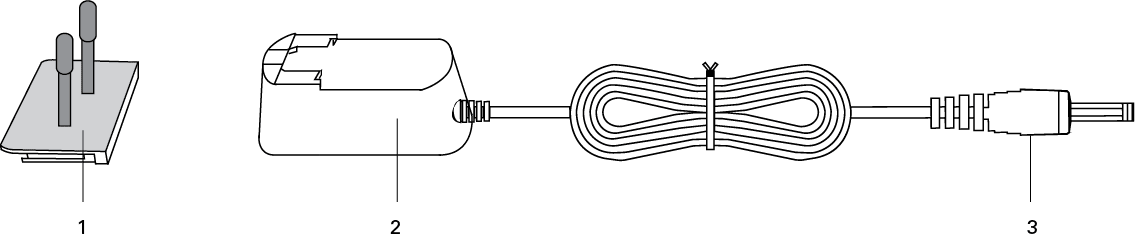
1. Plug
2. Adapter
3. DC Plug
How does IPL work
The IPL (Intense Pulsed Light) device projects light pulses on to the skin. During the process melanin in the hair absorbs the light pulses emitted from the device, thereby heating and destroying the hair follicle. This painless process then stimulates the hairs to go into the resting phase.
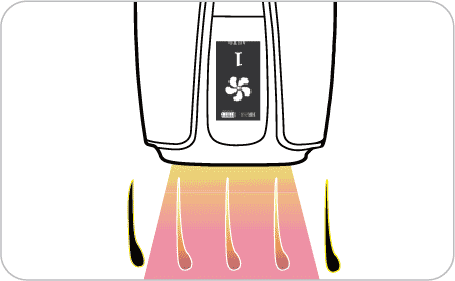
The darker the hair, the better the pulses of light are absorbed.
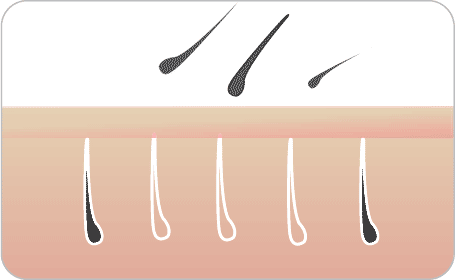
The pulses of light stimulate the hair follicle to go into a resting phase.
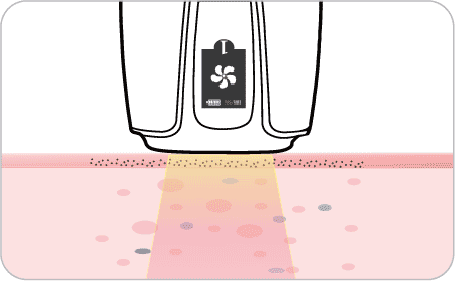
The IPL skin rejuvenation mode (SR) stimulates the regeneration of collagen and elastic fiber, which thereby improves the color and texture of the skin without surgery.
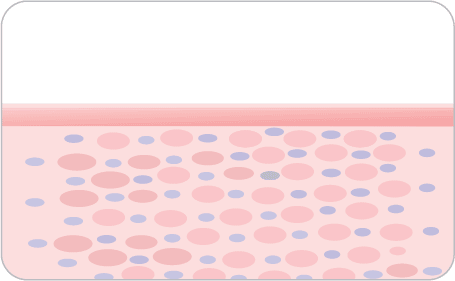
The IPL skin rejuvenation mode (SR) can treat some of the visible damage caused by sun exposure, which you may notice mostly on your face, neck, hands or chest.
General Conditions
Never use the device if you have dark skin. Check the skin tone table below to see if your skin is suited for using the device.
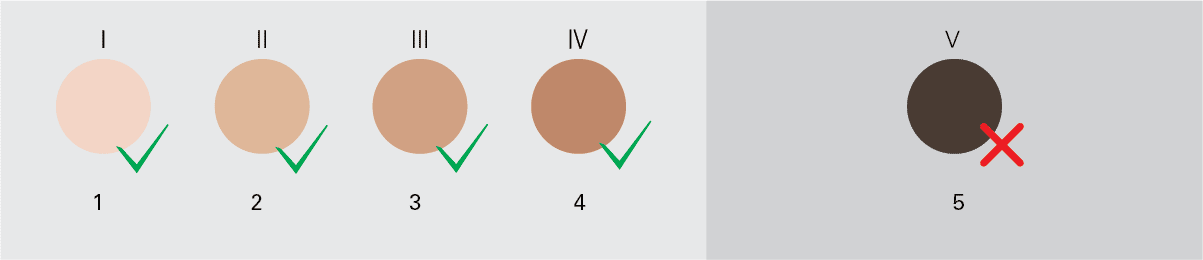
1. White
2. Beige
3. Light brown
4. Brown
5. Very Dark Brown / Black
The device is not effective if your hair color is light brown, light gold, red or white gray. Check the hair color table below to see if your hair color is suited for using the device.
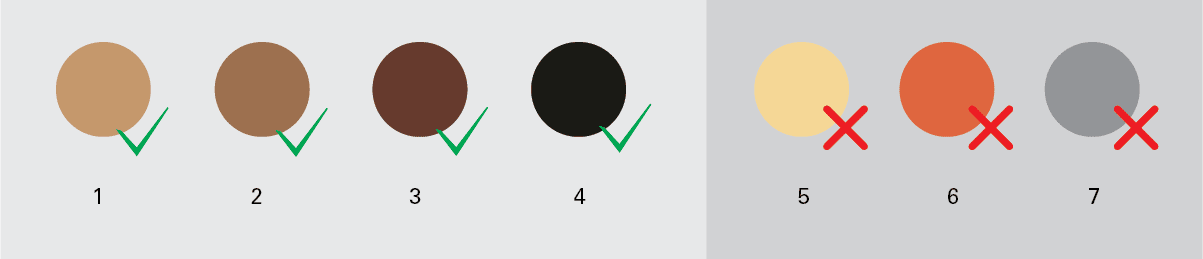
1. Dark Gold / Light Brown
2. Brown
3. Dark Brown
4. Black
5. Light (Gold or Blond)
6. Red
7. White / Gray
Never use the device if you are pregnant or breast feeding.
Never use the device if you have active implants.
Course Of Treatment
1st Treatment - (Week 0)
During the initial treatments, you might still see some hair growing. These are likely to be the hairs that were in their growing phase during the first treatment.
2nd & 3rd Treatment - (Week 2 & Week 4)
After 2-3 treatments, you should see a noticeable reduction in hair growth. However, to effectively treat all hair, it is important to keep on treating according to the recommended treatment schedule.
4th & 5th Treatment - (Week 6 & Week 8)
After 4-5 treatments, you should see a significant reduction of hair growth in the areas that you treated with the device.
A reduction of hair density should also be visible. Keep on treating with frequent touch-ups (every 4 weeks) to maintain the result.
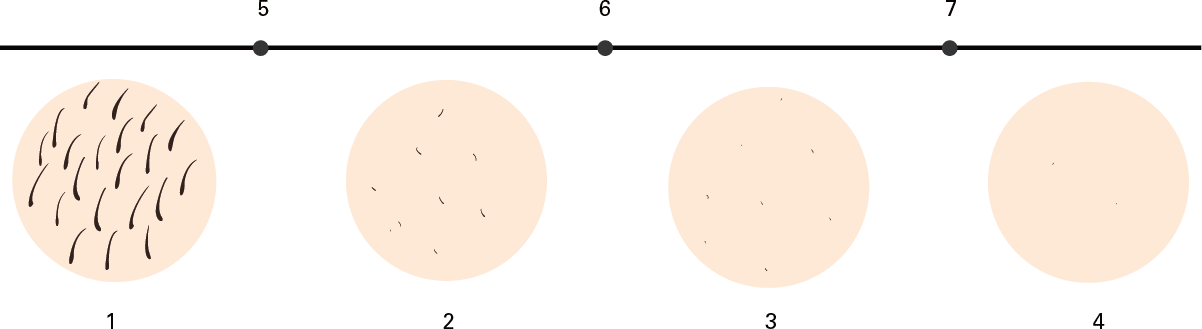
1. Zero week
2. Two weeks
3. Four weeks
4. Six weeks
5. Once every two weeks
6. Once a month
7. Use when needed
NOTE: Result may vary from person to person.
Before Use
1. Get your skin ready
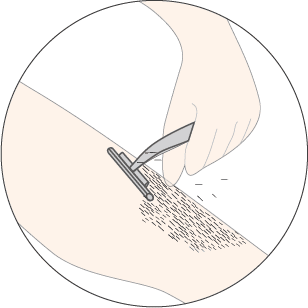
Before you use the device, shave all visible hair in the area you wish to treat.
Ensure there are no hairs remaining above the surface of the skin. This allows the light to be easily absorbed by the melanin located in the hair roots and ensures effective treatment.
You should only shave before using the device.
Do not wax, epilate or use depilatory creams, as anything else pulls hair from the roots (follicle) and hinders the IPL process.
If you choose to wax, please wait 6-8 days before using the device to let your skin rest.
We recommend that you take a shower before the treatment to ensure the skin is free from oily substance and dirt, and then pat your skin dry.
2. Skin test
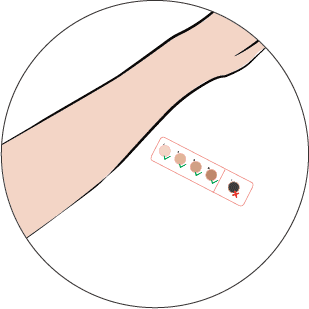
Check the skin tone table to see if your skin type allows the usage of the device.
Check the hair color table to see if your hair color allows the usage of the device.
While Use
1. Selecting the right intensity
The device provides 8 different light intensities and advices you on the right setting based on your skin tone. You will always be able to select the light intensity settings as you find comfortable.
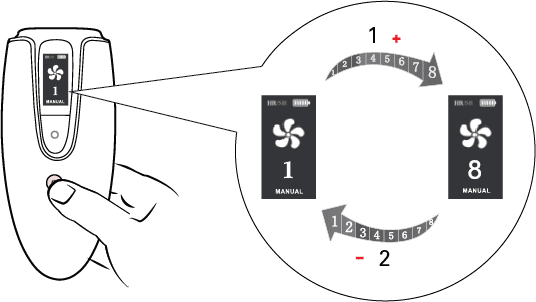
1. Up
2. Down
Press  for 2 seconds to turn the device ON.
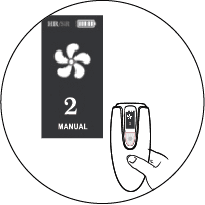
Short press to adjust the light intensity level. Each time you press , the light intensity level will gradually increase from 1st mode to 8th mode. After 8th mode, pressing the light intensity level will gradually decrease until 1st mode.
Press and hold  for 2 seconds to switch mode between "AUTO" and "MANUAL”. For “MANUAL” mode the IPL is active only when you press the button.
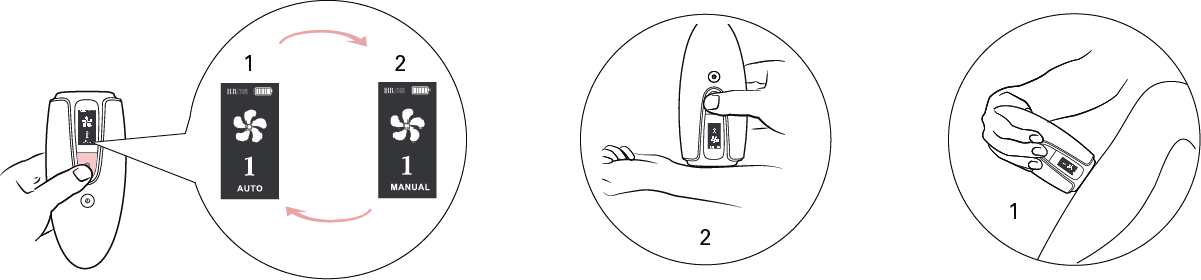
1. AUTO
2. MANUAL
Press and hold and for 2 seconds to switch mode between "Hair Removal (HR)" and "Skin Rejuvenation (SR)”.
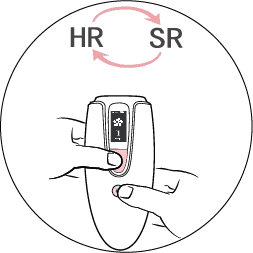
Note: There is only one intensity level for skin rejuvenation.
For hair removal, select the desired light intensity settings. Please see the table below to set the light intensity settings.
Skin Type & Tone |
Light intensity Setting |
I White: always sunburn, never tan. |
6-8 |
II Beige: easily sunburn, tan minimally |
5-7 |
III Light brown: sunburn easily, tan slowly to light brown. |
4-6 |
IV Brown: rarely sunburn, tan easily. |
2-4 |
V Brownish black or darker: rarely or never sunburn, very dark tanning. |
You cannot use the device |
If you experience discomfort or pain, reduce the light intensity level.
2. Handling the device
1. Clean the light exit window before use.
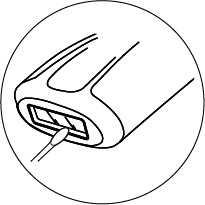
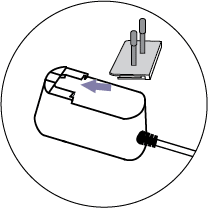
2. Insert the plug.
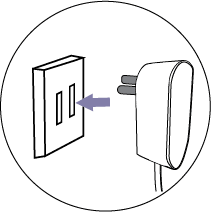
3. Plug the power supply in the wall socket.
4. Switch on the device and select the right light intensity for your skin tone.
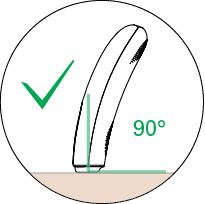
5. Place the device at a 90° angle on the skin so that the skin contact surface of the device is in contact with your skin.
6. Leave no gaps between the skin and the device to ensure no light escapes.
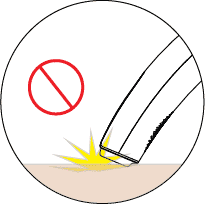
Press the device firmly onto your skin to ensure proper skin contact. Press to release a flash. You will feel a warm sensation because of the flash. This is normal.
Place the device (flash/light) window in full contact with the skin to make sure the device works correctly. If not in proper contact with the skin, the device will not work.
Place the device on the next area to be treated. After each flash, it takes up to 1-3 seconds until the device is ready to flash again.
For larger body areas use AUTO mode. For smaller areas use MANUAL mode.
When you have finished the treatment, press and hold for 2 seconds to switch OFF the device.
Remove the adapter from the electric socket.
It is important to wipe clean the (flash/light) window after every use.
3. Treatment Schedule
1) Hair removal schedule
1. In the first phase of your treatment, treat once a week for 4 - 8 weeks (depending on your skin result).
2. After this period use your handset once a month, for 3 months or until satisfied.
3. To maintain hairless smooth skin, use your handset once every 2 to 3 months, or as needed.
Week
2) Skin rejuvenation schedule
We suggest to use the skin rejuvenation (SR) every 3 days.
After Use
1. After treatment
After the IPL treatment, you can safely apply lotion, creams or moisturizer on the treated area.
If you experience skin irritation or skin redness after the treatment, wait until it disappears before applying any product (lotion or cream) on your skin.
2. Common reactions
Your skin may shows slight redness, and it may prickle, tingle or feel warm. This is an absolutely normal and harmless reaction, and it will disappear after short time.
Dry skin and itching may occur due to shaving or a combination of shaving and IPL treatment. This is also a normal and harmless reaction.
You can cool the area with ice or a wet face cloth. If dryness persists, you can apply a non-scented moisturizer on the treated area.
3. Rare Side effects
Burns, excessive redness (e.g. around hair follicle).
Skin discoloration.
Epidermal heating.
Device Cleaning and Storage
After use, switch OFF the device, unplug it and let it cool down.
Use a soft, moist cloth to clean the IPL parts such as (flash/light) window, the outside surface of the attachments and the reflectors on the side.
Store the device in a dust free and dry place.
Device Specifications
Product |
IPL hair removal device
|
Model |
110-03/04/05 |
Rated input
|
AC100-240V/50-60Hz |
Rated output
|
DC 12V, 2.5A
|
Executive
standard |
GH4706.1 GB4706.15 |
Protection against
electric shock |
II |
Protections rating |
IP 30 (EN 60529) |
Spectrum |
>550nm |
Pulse duration |
0.9+/-0.2ms |
Max light energy |
7.92 – 15.31J |
Operating Temperature |
5-35℃ |
Operating Humidity |
15% - 75% |
Weight |
209g |
Size
|
H179*W70*D35mm |
Frequently Asked Questions
Q. The device does not flash when I place the device on the skin?
A: Please make sure the device is at a 90 degree angle on the skin, so the device sensor can detect the skin and thereby flash.
Q. Why does the device produce a strange smell?
A: Either the device light/flash (window) was dirty, or you did not shave the treatment area properly. This will make the burned hair produce the strange smell.
Q. Why does my skin reaction after treatment last longer than usual?
A: You may have used an IPL intensity level settings that is too high for your skin type.
Q. I don't see any significant results after the treatment?
A: You may have used an IPL intensity level settings that is too low for your skin type, or you respond more slowly towards your IPL treatment than average.
Q. Why does the device/adapter becomes warm during use?
A: This is normal. The device produces a large amount of energy when it emits light, which causes the device to warm up
Q. Why should I shave before using this IPL device?
A: The goal is to reach the IPL light energy to the hair follicle as quickly as possible. So shaving before is essential to achieve the best results.
Q. Can I use the IPL device before or after tanning?
A: If you have recently been tanning, we recommend waiting 2 weeks before using the device. You should wait 48 hours to tan after using the device. Artificial tan should not be on your skin while using your device.
Q. Is this device suitable for men?
A: Definitely! This device is suitable for both men and women.
Q. How often will I have to treat to maintain the hair removal results?
A: After completing your start-up phase, you can continue to treat according to your needs.
Q. Do I need to stay out of the sun after using device?
A: After treatment, we recommend using sunscreen, whenever treated areas may be exposed to the sun.
Q. My skin turned red and feel painful after using the device. Is this a problem?
A: Treated skin may temporarily turn red or feel painful depending on the skin type, or on the method the device is used by the person. If the above symptoms do not disappear in 2 days, please consult your doctor or a dermatologist.